# Getting Started with GraphQL Federation - Fusion
> Follow a practical GraphQL Federation tutorial to build two subgraphs, compose a unified schema, and query the unified API with ChilliCream's Fusion gateway.
Canonical source: https://chillicream.com/docs/fusion/getting-started
In this tutorial, you will build and run a small Fusion setup locally.
By the end, you will have:
- A Products subgraph on `http://localhost:5001/graphql`
- A Reviews subgraph on `http://localhost:5002/graphql`
- A Fusion gateway on `http://localhost:5000/graphql`
- One composed API that clients query through the gateway
If you want the broader conceptual background first, read [Overview](https://chillicream.com/docs/fusion).
## What Is Fusion and Why Use It?
Hot Chocolate Fusion lets you split a GraphQL API across multiple independent services, called **subgraphs**, and present them to clients as a single, unified schema (called a **composite schema** in the spec). Each subgraph contributes types and fields to the overall API, runs in its own process, and can be developed, deployed, and scaled independently.
A **gateway** sits in front of all your subgraphs, receives client queries, routes each part of the query to the subgraphs that own the requested fields, and combines the results. From the client's perspective, they are querying a single GraphQL endpoint with one schema. The gateway handles everything transparently.
Instead of building one monolithic GraphQL server that knows about every domain in your system, you let each team own and ship their own GraphQL service. Fusion handles the hard part by composing those services into a single schema that clients query without knowing (or caring) how many services are behind it.
**When should you use Fusion?** Fusion becomes valuable when your API spans multiple domains (products, reviews, accounts, shipping), when different teams own different parts of the API, or when you need to deploy and scale parts of your API independently. If you find yourself wanting to break a growing monolith into smaller, team-owned services without forcing clients to stitch together calls to multiple endpoints, Fusion is the tool for the job.
## Thinking in Composite Schemas
When you first encounter distributed GraphQL, there is a natural assumption about how subgraphs interact that turns out to be wrong. Getting the right mental model now will save you from the most common design mistakes.
### One GraphQL Schema, Many Contributors
In Fusion, all subgraphs contribute to **one shared GraphQL schema**. There is no "Products Schema" and "Reviews Schema" that exist as separate GraphQL schemas. There is one graph that describes your entire domain, and different subgraphs are responsible for different parts of it.
This means a single type can have fields contributed by multiple subgraphs. For example, the `Product` type might get its `name` and `price` fields from the Products subgraph, its `reviews` field from the Reviews subgraph, and its `deliveryEstimate` field from the Shipping subgraph. From the client's perspective, `Product` is one type with all those fields. The gateway figures out where each field lives and fetches it from the right place.
### Subgraphs Don't Call Each Other
When you split an API across multiple services, it is tempting to think each subgraph needs to call other subgraphs directly. Consider two subgraphs: one that manages Tenants, and one that manages Users. A `User` belongs to a `Tenant`.
**You might assume this is how it works:**
> "My Users subgraph stores a `tenantId` on each User. To resolve the full Tenant object, I need my Users subgraph to call the Tenants subgraph and fetch it."
This seems reasonable, but it creates a problem: your subgraphs become coupled. The Users subgraph has to know where the Tenants subgraph lives, how to call it, and how to handle failures. As you add more subgraphs, these cross-service dependencies multiply.
**How Fusion actually works:**
> "My Users subgraph knows that each User has a `tenantId`, and I declare that `user.tenant` returns a `Tenant` identified by that ID. I don't need to know _how_ or _where_ the Tenant gets resolved, because the gateway handles that."
In Fusion, your subgraph never calls another subgraph. Instead, it says: "this field returns a Tenant with this ID" and trusts the gateway to figure out the rest. The gateway knows which subgraph can resolve a Tenant by ID, using a **lookup**, which is a query field that resolves an entity by its key. The Tenants subgraph provides this lookup resolver, and the gateway calls it when it needs to turn a tenant ID into a full Tenant object. The Users subgraph never talks to the Tenants subgraph directly. The gateway handles all coordination.
### Why This Matters
This design has practical consequences:
- **Subgraphs stay independent.** The Users subgraph does not import anything from the Tenants subgraph. It just knows that `Tenant` is an entity with an `id` field.
- **Adding new subgraphs is safe.** If a new Billing subgraph wants to contribute a `billingPlan` field to the `Tenant` type, it can do so without modifying the Tenants or Users subgraphs.
- **The gateway is the coordinator.** Cross-subgraph data fetching is the gateway's job, not yours. Your subgraph only needs to know how to resolve the fields it owns and how to look up its own entities by key. When you build your subgraphs in the following sections, keep this model in mind: each subgraph contributes to one API, declares its entities and lookups, and trusts the gateway to wire everything together.
## Key Concepts
Before diving into code, here are the core terms you will encounter throughout this guide. Each builds on the mental model from the previous section.
**Subgraph:** An independent GraphQL service that contributes types and fields to the overall API. Each subgraph runs in its own process, owns its own data, and defines resolvers for the fields it contributes. In Hot Chocolate, a subgraph is a standard Hot Chocolate server with a few additional attributes that tell Fusion how its types fit into the larger API.
**Source Schema:** The GraphQL schema exposed by a single subgraph. When you export a subgraph's schema (as a `.graphqls` file), that exported schema is the source schema. Fusion's composition engine reads source schemas from all your subgraphs and merges them into the composite schema.
**Composite Schema:** The unified, client-facing GraphQL schema produced by merging all source schemas. All types and fields from every subgraph appear in the composite schema, and clients can query across subgraph boundaries in a single request as if they were querying a single monolithic GraphQL server. They never interact with individual subgraphs directly.
**Gateway:** The service that sits between clients and subgraphs. It exposes the composite schema, receives client queries, analyzes each query, routes parts of it to the appropriate subgraphs, and combines the results into a single response. In Hot Chocolate, you create a gateway by calling `AddGraphQLGateway()` in a standard ASP.NET Core project.
**Query Planning:** The process the gateway uses to build an optimized execution plan for a client query across multiple subgraphs. When a query touches fields from different subgraphs, the gateway analyzes the query, determines which subgraphs own which fields, and creates a plan that fetches data in the right order.
**Entity:** A type with a stable key that can be referenced across subgraphs. Entity keys (such as `id` or `sku`) uniquely identify each instance and are used for cross-subgraph references and resolution.
**Lookup:** A query field the gateway uses to enrich an already-referenced entity with additional fields from another subgraph.
GraphQL
```
type Query {
productById(id: ID!): Product @lookup
}
```
- An **internal lookup** (marked with the `@internal` directive) is excluded from the composite schema, cannot be called by clients, and is used only by the gateway for cross-subgraph entity resolution.
GraphQL
```
type Query {
productById(id: ID!): Product @internal @lookup
}
```
**Shareable:** A contract for fields that are defined in multiple subgraphs. By default, each non-key field must be defined by exactly one subgraph. If the same field appears in multiple subgraphs, composition fails until every definition is explicitly marked with the `@sharable` directive. This asserts that all definitions have the same semantics, and it allows the query planner to fetch the field from any subgraph subgraph providing this field.
GraphQL
```
type User {
name: String @sharable
}
```
## Prerequisites
To follow this tutorial, you need the following installed on your machine.
### .NET SDK
Install the [.NET 10 SDK](https://dotnet.microsoft.com/download) or later. Verify your installation:
Bash
```
dotnet --version
```
You should see `10.0.100` or higher.
### Nitro CLI
The Nitro CLI is a .NET tool that handles schema composition. Install it globally:
Bash
```
dotnet tool install -g ChilliCream.Nitro.CommandLine
```
Verify the installation:
Bash
```
nitro version
```
### Hot Chocolate Templates
Install the Hot Chocolate templates:
Bash
```
dotnet new install HotChocolate.Templates
```
## Create Your First Subgraph (Products)
Time to write code. You will create a Products subgraph that exposes a few products through a GraphQL API. This subgraph will later become part of your composed API.
### Project Setup
Create a new GraphQL server project from the template:
Bash
```
mkdir fusion-getting-started
cd fusion-getting-started
dotnet new graphql -n Products
```
The template creates sample files in `Products/Types` (`Author.cs`, `Book.cs`, `Query.cs`). Delete those files before continuing so your schema only contains the tutorial types.
Your `Products/Products.csproj` should now look like this:
XML
```
net10.0
enable
enable
preview
runtime; build; native; contentfiles; analyzers; buildtransitive
all
```
### Configure the Port
The `dotnet new graphql` template already defines a default port in `launchSettings.json`. For this tutorial, change it so the Products subgraph runs on port 5001\. Edit `Products/Properties/launchSettings.json` and set `launchUrl` and `applicationUrl` under the `http` profile to:
JSON
```
"launchUrl": "http://localhost:5001/graphql",
"applicationUrl": "http://localhost:5001"
```
This ensures the subgraph runs on port 5001, which matches what we will configure for composition later.
### Define the Product Type
Create a file called `Product.cs` in the Products project:
C#
```
namespace Products;
public class Product
{
public int Id { get; set; }
public required string Name { get; set; }
public double Price { get; set; }
}
```
This is a plain C# class with nothing GraphQL-specific yet.
### Add In-Memory Data
Create a file called `ProductRepository.cs`:
C#
```
namespace Products;
public static class ProductRepository
{
private static readonly List Products =
[
new Product { Id = 1, Name = "Table", Price = 899.99 },
new Product { Id = 2, Name = "Couch", Price = 1299.50 },
new Product { Id = 3, Name = "Chair", Price = 54.00 },
];
public static Product? GetById(int id)
=> Products.FirstOrDefault(p => p.Id == id);
public static List GetAll()
=> Products;
}
```
> In production, use **DataLoader** or **batch resolvers** in your subgraphs to batch backend lookups and reduce N+1 query patterns. This is especially important for entity lookups across subgraphs. See the [Fusion demo project](https://github.com/ChilliCream/fusion-demo) for a more complete example.
### Expose Products Through GraphQL
Create a file called `ProductQueries.cs`. This class defines the Query root fields for the Products subgraph:
C#
```
namespace Products;
[QueryType]
public static partial class ProductQueries
{
[Lookup]
public static Product? GetProductById(int id)
=> ProductRepository.GetById(id);
public static List GetProducts()
=> ProductRepository.GetAll();
}
```
Two attributes to notice:
- **`[QueryType]`** tells Hot Chocolate that this class contributes fields to the `Query` root type. The source generator (from `HotChocolate.Types.Analyzers`) automatically registers these fields.
- **`[Lookup]`** marks `GetProductById` as a lookup resolver. This is how the gateway resolves a `Product` when another subgraph references it. Without this attribute, the gateway would have no way to fetch a Product by its ID from this subgraph. Because this lookup is **public**, it also appears in the composite schema as a query field clients can call directly. Lookups must return nullable entity types (`Product?`) so unresolved keys can return `null` and avoid cascading failures when one or more subgraphs cannot provide requested fields for an entity.
### Configure the Server
Set `Program.cs` to:
C#
```
var builder = WebApplication.CreateBuilder(args);
builder
.AddGraphQL("Products")
.AddTypes();
var app = builder.Build();
app.MapGraphQL();
app.RunWithGraphQLCommands(args);
```
This is a minimal Hot Chocolate server. `AddGraphQL("Products")` sets the subgraph name used during schema export. `AddTypes()` registers all discovered types, including `ProductQueries` and `Product`. `RunWithGraphQLCommands(args)` enables CLI commands, including schema export.
### Test the Subgraph
Run the Products subgraph:
Bash
```
cd Products
dotnet run
```
Open your browser to `http://localhost:5001/graphql/` to access the Nitro GraphQL IDE. Try this query:
GraphQL
```
query {
products {
id
name
price
}
}
```
You should see:
JSON
```
{
"data": {
"products": [
{ "id": 1, "name": "Table", "price": 899.99 },
{ "id": 2, "name": "Couch", "price": 1299.5 },
{ "id": 3, "name": "Chair", "price": 54 }
]
}
}
```
Also test the lookup resolver, which the gateway will use later:
GraphQL
```
query {
productById(id: 1) {
id
name
price
}
}
```
Stop the server with `Ctrl+C` before continuing.
### Export the Schema
The gateway needs each subgraph's source schema for composition. Hot Chocolate can export source schema files automatically. From the `fusion-getting-started` directory, run:
Bash
```
dotnet run --project ./Products -- schema export
```
This generates two files in the Products project directory:
- **`schema.graphqls`**: The Products subgraph's source schema, describing its types and fields.
- **`schema-settings.json`**: A companion file that tells Fusion the subgraph's name and runtime URL and other subgraph options.
Because `Program.cs` uses `AddGraphQL("Products")`, `Products/schema-settings.json` already contains `"name": "Products"`. The generated transport URL still defaults to `http://localhost:5000/graphql`, so update it to match port 5001:
JSON
```
{
"name": "Products",
"transports": {
"http": {
"url": "http://localhost:5001/graphql"
}
}
}
```
The `name` field identifies this subgraph within the composite schema and must be unique. The `url` is where the gateway sends requests to this subgraph at runtime.
### What You Built
Your Products subgraph now:
- Exposes a `products` query that returns all products
- Provides a `productById` lookup that the gateway will use to resolve Product references from other subgraphs
- Has an exported schema file (`schema.graphqls`) describing its types
- Has a settings file (`schema-settings.json`) telling Fusion where to reach it at runtime
In the next section, you will create a second subgraph (Reviews) that references Products. This is where the power of Fusion starts to show.
## Create a Second Subgraph (Reviews)
Now you will create a Reviews subgraph that adds review data to the API. The key part is that the Reviews subgraph will add a `reviews` field to the `Product` type that lives in the Products subgraph. This is Fusion's core capability: multiple subgraphs contributing fields to the same type.
### Project Setup
From the `fusion-getting-started` directory:
Bash
```
dotnet new graphql -n Reviews
```
The template also creates sample files in `Reviews/Types` (`Author.cs`, `Book.cs`, `Query.cs`). Delete those files before continuing.
### Configure the Port
The `dotnet new graphql` template already defines a default port in `launchSettings.json`. For this tutorial, change it so the Reviews subgraph runs on port 5002\. Edit `Reviews/Properties/launchSettings.json` and set `launchUrl` and `applicationUrl` under the `http` profile to:
JSON
```
"launchUrl": "http://localhost:5002/graphql",
"applicationUrl": "http://localhost:5002"
```
The Reviews subgraph runs on port 5002, while the Products subgraph runs on 5001.
### Define the Review Type
Create `Review.cs` in the Reviews project:
C#
```
namespace Reviews;
public class Review
{
public int Id { get; set; }
public required string Body { get; set; }
public int Stars { get; set; }
public int ProductId { get; set; }
}
```
Each review has a `ProductId` that references a product from the Products subgraph.
### Add In-Memory Data
Create `ReviewRepository.cs`:
C#
```
namespace Reviews;
public static class ReviewRepository
{
private static readonly List Reviews =
[
new Review { Id = 1, Body = "Sturdy and well-built.", Stars = 5, ProductId = 1 },
new Review { Id = 2, Body = "A bit wobbly.", Stars = 3, ProductId = 1 },
new Review { Id = 3, Body = "Very comfortable!", Stars = 5, ProductId = 2 },
new Review { Id = 4, Body = "Good value for the price.", Stars = 4, ProductId = 3 },
];
public static Review? GetById(int id)
=> Reviews.FirstOrDefault(r => r.Id == id);
public static List GetByProductId(int productId)
=> Reviews.Where(r => r.ProductId == productId).ToList();
public static List GetAll()
=> Reviews;
}
```
Notice that reviews reference products by `ProductId`. Reviews 1 and 2 belong to Product 1 (Table), Review 3 belongs to Product 2 (Couch), and Review 4 belongs to Product 3 (Chair).
### Define the Product Stub
This is the most important file in this section. Create `Product.cs`:
C#
```
namespace Reviews;
public sealed record Product(int Id)
{
public List GetReviews()
=> ReviewRepository.GetByProductId(Id);
}
```
This is **not** a duplicate of the Product type from the Products subgraph. It is an **entity stub**, a lightweight declaration that says: "I know `Product` exists in the API, identified by `Id`, and I want to add a `reviews` field to it."
The Reviews subgraph does not define `name`, `price`, or any other Product fields. It only contributes the `reviews` field. When the gateway composes the API, it merges this stub with the full `Product` type from the Products subgraph. Clients see one `Product` type with:
- `id`, `name`, and `price` from the Products subgraph
- `reviews` from the Reviews subgraph
All fields appear on a single unified `Product` type in the composite schema.
### Add Query Resolvers
Create `ReviewQueries.cs`:
C#
```
namespace Reviews;
[QueryType]
public static partial class ReviewQueries
{
[Lookup]
public static Review? GetReviewById(int id)
=> ReviewRepository.GetById(id);
public static List GetReviews()
=> ReviewRepository.GetAll();
}
```
And create `ProductQueries.cs`. This provides the internal lookup that lets the gateway resolve Product references within the Reviews subgraph:
C#
```
namespace Reviews;
[QueryType]
public static partial class ProductQueries
{
[Lookup, Internal]
public static Product? GetProductById(int id)
=> new(id);
}
```
Two attributes to notice:
- **`[Lookup]`** makes this a lookup resolver for the `Product` entity. The gateway calls this when it needs to resolve a Product reference.
- **`[Internal]`** hides this field from the composite schema. Clients cannot call `productById` on the Reviews subgraph directly. It exists only for the gateway's internal use during query planning.
Why is the internal lookup needed? When a client queries `review.product.reviews`, the gateway needs a way to enter the Reviews subgraph's `Product` type so it can resolve the `reviews` field. The internal lookup provides this entry point. Given a product ID (which the gateway already knows from another subgraph), it constructs a `Product` stub that the `reviews` field can then resolve against.
Notice that this lookup returns `Product?` (nullable), even though it is internal. Lookups should be nullable so unresolved keys can return `null` and avoid cascading failures across subgraphs. In this sample, the resolver still constructs a stub with `new(id)` because the key is already known.
### Configure the Server
Set `Program.cs` to:
C#
```
var builder = WebApplication.CreateBuilder(args);
builder
.AddGraphQL("Reviews")
.AddTypes();
var app = builder.Build();
app.MapGraphQL();
app.RunWithGraphQLCommands(args);
```
This follows the same pattern as the Products subgraph, but sets the subgraph name to `Reviews`.
### Add the ObjectType Extension
There is one more piece needed. The `Review` type currently exposes a raw `ProductId`. To expose `review.product` instead, add a type extension for `Review`. Create `ReviewNode.cs`:
C#
```
using HotChocolate.Types;
namespace Reviews;
[ObjectType]
public static partial class ReviewNode
{
[BindMember(nameof(Review.ProductId))]
public static Product GetProduct([Parent] Review review)
=> new(review.ProductId);
}
```
- **`[ObjectType]`** tells Hot Chocolate that this class extends the `Review` type.
- **`[BindMember(nameof(Review.ProductId))]`** replaces the raw `ProductId` integer on `Review` with a resolved `Product` object. In the exported schema, clients see `review.product` (returning a full `Product`) instead of `review.productId` (returning a raw integer).
- **`[Parent]`** tells Hot Chocolate to inject the parent object (the `Review`) into the resolver. This is how `GetProduct()` accesses the `ProductId` from the review it belongs to.
This transformation happens in the GraphQL schema, not your C# classes. Your `Review` class still has a `ProductId` field internally, but in the exported schema that field is replaced with `product: Product`. When a client queries `review.product`, Hot Chocolate calls `GetProduct()`, reads the `ProductId` from the parent Review, and returns a `Product` stub with just that ID. The gateway then uses the Product lookup to fetch the full product data from whichever subgraph owns it.
### Test the Subgraph
Run the Reviews subgraph:
Bash
```
cd Reviews
dotnet run
```
Open `http://localhost:5002/graphql/` and try:
GraphQL
```
query {
reviews {
id
body
stars
}
}
```
You should see:
JSON
```
{
"data": {
"reviews": [
{ "id": 1, "body": "Sturdy and well-built.", "stars": 5 },
{ "id": 2, "body": "A bit wobbly.", "stars": 3 },
{ "id": 3, "body": "Very comfortable!", "stars": 5 },
{ "id": 4, "body": "Good value for the price.", "stars": 4 }
]
}
}
```
Now try a query that exercises the entity stub and `[BindMember]`:
GraphQL
```
query {
reviews {
id
body
product {
id
reviews {
body
}
}
}
}
```
You should see each review with its product reference, and each product with its reviews. Notice that `product.name` and `product.price` are not available here. Those fields live in the Products subgraph and will only appear after composition in the gateway. Within the Reviews subgraph alone, `Product` only has the fields the Reviews subgraph contributes: `id` and `reviews`.
Stop the server with `Ctrl+C`.
### Export the Schema
Export the Reviews subgraph's source schema. From the `fusion-getting-started` directory:
Bash
```
dotnet run --project ./Reviews -- schema export
```
This generates two files in the Reviews project directory:
- **`schema.graphqls`**: The Reviews subgraph's source schema, describing its types and fields.
- **`schema-settings.json`**: A companion file that tells Fusion the subgraph's name and runtime URL and other subgraph options.
Because `Program.cs` uses `AddGraphQL("Reviews")`, `Reviews/schema-settings.json` already contains `"name": "Reviews"`. The generated transport URL still defaults to `http://localhost:5000/graphql`, so update it to match port 5002:
JSON
```
{
"name": "Reviews",
"transports": {
"http": {
"url": "http://localhost:5002/graphql"
}
}
}
```
The `name` field identifies this subgraph within the composite schema and must be unique. The `url` is where the gateway sends requests to this subgraph at runtime.
### What You Built
Your Reviews subgraph now:
- Exposes a `reviews` query and a `reviewById` lookup
- Adds a `reviews` field to the `Product` type using an entity stub, without duplicating any Product data
- Replaces the raw `productId` on reviews with a resolved `Product` reference via `[BindMember]`
- Provides an internal `productById` lookup that the gateway uses for cross-subgraph resolution
- Has an exported schema and settings file ready for composition
You now have two independent subgraphs that contribute to one shared API. In the next section, you will compose them into a single composite schema.
## Compose the Schemas with Nitro CLI
You now have two subgraphs, each with an exported schema and a settings file. The next step is **composition**: merging these source schemas into a single composite schema that the gateway will serve to clients.
Composition is handled by the Nitro CLI. It reads each subgraph's `.graphqls` schema file and its companion `-settings.json` file, validates that the schemas are compatible, and produces a **Fusion archive** (`.far` file) that contains everything the gateway needs: the composite schema, the execution schema with routing metadata, and the transport configuration for each subgraph.
### Verify Your File Structure
Before running composition, make sure your project looks like this:
```
fusion-getting-started/
├── Products/
│ ├── Product.cs
│ ├── ProductQueries.cs
│ ├── ProductRepository.cs
│ ├── Program.cs
│ ├── Products.csproj
│ ├── schema.graphqls <-- exported schema
│ └── schema-settings.json <-- subgraph settings
└── Reviews/
├── Review.cs
├── ReviewRepository.cs
├── ReviewQueries.cs
├── ProductQueries.cs
├── Product.cs
├── ReviewNode.cs
├── Program.cs
├── Reviews.csproj
├── schema.graphqls <-- exported schema
└── schema-settings.json <-- subgraph settings
```
Each subgraph directory has a `schema.graphqls` and a `schema-settings.json`. The Nitro CLI matches these files by their shared prefix (`schema`).
### Run Composition
From the `fusion-getting-started` directory, run:
Bash
```
mkdir Gateway
nitro fusion compose -f Products/schema.graphqls -f Reviews/schema.graphqls -a Gateway/gateway.far
```
If composition succeeds, you will see output similar to:
```
Validating source schemas...
Merging schemas...
Fusion archive created: gateway.far
```
The exact output may vary by Nitro CLI version. Confirm that `Gateway/gateway.far` was created. This file contains the composed gateway configuration, and the gateway loads it directly.
### What Happens During Composition
The Nitro CLI performs four steps:
1. **Validate** source schemas: check GraphQL validity and Fusion metadata.
2. **Merge** source schemas: combine matching types and enforce field ownership rules.
3. **Check satisfiability**: verify that cross-subgraph selections can actually be fulfilled with the available keys and lookups.
4. **Produce** output: create the composite schema plus routing metadata for the gateway.
## Run the Fusion Gateway
The gateway is the service that clients connect to. It loads the composed configuration from the `.far` file, exposes the composite schema, and routes queries to the appropriate subgraphs at runtime.
### Create the Gateway Project
From the `fusion-getting-started` directory:
Bash
```
cd Gateway
dotnet new graphql-gateway
cd ..
```
The `graphql-gateway` template already includes the `HotChocolate.Fusion.AspNetCore` package and a working gateway `Program.cs`.
Your `Gateway/Gateway.csproj` should look like this:
XML
```
net10.0
enable
enable
```
### Configure the Port
Edit `Gateway/Properties/launchSettings.json` and set `launchUrl` and `applicationUrl` under the `http` profile to:
JSON
```
"launchUrl": "http://localhost:5000/graphql",
"applicationUrl": "http://localhost:5000"
```
The gateway runs on port 5000\. The subgraphs run on ports 5001 (Products) and 5002 (Reviews).
### Verify the Fusion Archive
The composition step already wrote `gateway.far` into the `Gateway` directory (`-f Gateway/gateway.far`). Verify that the file exists before continuing:
Bash
```
ls Gateway/gateway.far
```
### Configure the Gateway
The template generates `Gateway/Program.cs`. For this tutorial, enable operation-plan telemetry so Nitro can show execution metrics in the Operation Plan view:
C#
```
var builder = WebApplication.CreateBuilder(args);
builder.Services
.AddHttpClient("fusion");
builder
.AddGraphQLGateway()
.AddFileSystemConfiguration("./gateway.far")
.ModifyRequestOptions(o => o.CollectOperationPlanTelemetry = true);
var app = builder.Build();
app.MapGraphQL();
app.Run();
```
Three things to notice:
- **`AddHttpClient("fusion")`** registers a named HTTP client called `"fusion"`. The gateway uses this client to send requests to the subgraphs. The name `"fusion"` is the default HTTP client name that Fusion uses when no explicit `clientName` is specified in the subgraph's `schema-settings.json`.
- **`AddGraphQLGateway()`** registers the Fusion gateway services. This is what makes this project a gateway rather than a regular GraphQL server.
- **`AddFileSystemConfiguration("./gateway.far")`** tells the gateway to load its composed configuration from a local file. In production, you would typically use `.AddNitro()` to download the configuration from the Nitro cloud, but for local development the file system approach is simpler.
- **`ModifyRequestOptions(o => o.CollectOperationPlanTelemetry = true)`** enables operation-plan telemetry. This is off by default.
### Start Everything
You need all three services running at the same time: both subgraphs and the gateway. Open three terminal windows and start the subgraphs first.
Caution
Start the Products and Reviews subgraphs before the gateway. The gateway connects to each subgraph on startup and may log errors if they are not reachable.
**Terminal 1: Products subgraph**
Bash
```
cd fusion-getting-started/Products
dotnet run
```
**Terminal 2: Reviews subgraph**
Bash
```
cd fusion-getting-started/Reviews
dotnet run
```
**Terminal 3: Gateway**
Bash
```
cd fusion-getting-started/Gateway
dotnet run
```
Wait for all three services to start. You should see output like this in each terminal:
```
info: Microsoft.Hosting.Lifetime[14]
Now listening on: http://localhost:5001
info: Microsoft.Hosting.Lifetime[0]
Application started. Press Ctrl+C to shut down.
```
The port number will differ for each service (5001, 5002, and 5000). If you see errors like "Address already in use," another process is using that port. Either stop it or choose a different port in `launchSettings.json`.
### Verify the Gateway
Open your browser to `http://localhost:5000/graphql/` to access the Nitro GraphQL IDE on the gateway. Try a simple query to verify the gateway is working:
GraphQL
```
query {
products {
id
name
price
}
}
```
You should see the same product data as when you queried the Products subgraph directly. The difference is that this query went through the gateway, which routed it to the Products subgraph behind the scenes. If you look at the terminal running the Products subgraph (Terminal 1), you should see a log entry showing it received and processed the request. This confirms the gateway successfully routed the query.
### What You Built
Your gateway now:
- Loads the composed configuration from the `gateway.far` file
- Exposes the unified composite schema on port 5000
- Routes queries to the Products and Reviews subgraphs as needed
- Acts as the single entry point for clients, so they never talk to the subgraphs directly
In the next section, you will run queries that demonstrate the gateway coordinating data across both subgraphs in a single request.
## Query Across Subgraphs
This is the moment everything comes together. With all three services running (Products on 5001, Reviews on 5002, Gateway on 5000), you can now run a single query that fetches data from both subgraphs.
### The Cross-Subgraph Query
Open Nitro at `http://localhost:5000/graphql/` and run this query:
GraphQL
```
query {
products {
id
name
price
reviews {
body
stars
}
}
}
```
Example in Nitro:
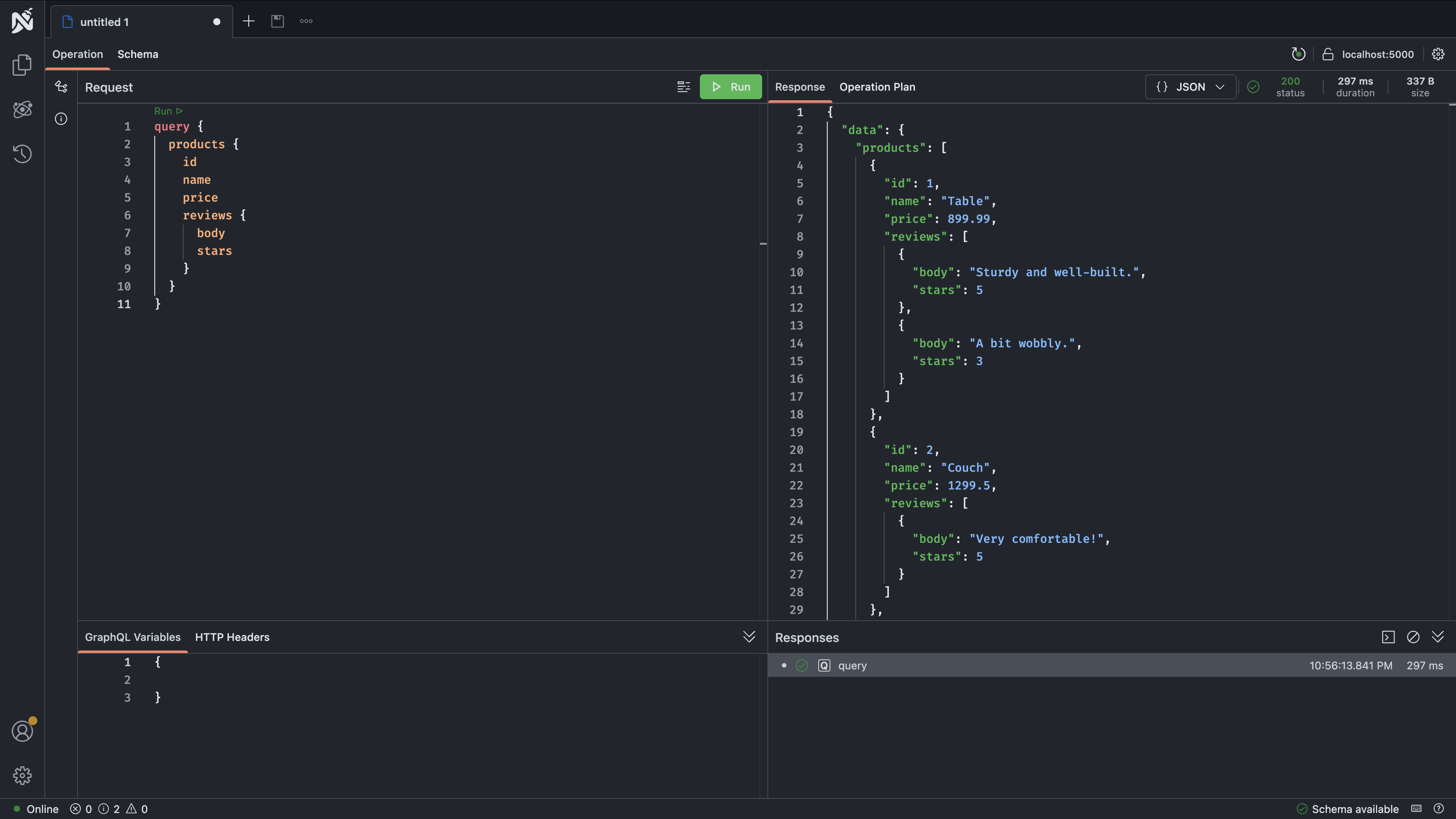
You should see:
JSON
```
{
"data": {
"products": [
{
"id": 1,
"name": "Table",
"price": 899.99,
"reviews": [
{ "body": "Sturdy and well-built.", "stars": 5 },
{ "body": "A bit wobbly.", "stars": 3 }
]
},
{
"id": 2,
"name": "Couch",
"price": 1299.5,
"reviews": [{ "body": "Very comfortable!", "stars": 5 }]
},
{
"id": 3,
"name": "Chair",
"price": 54,
"reviews": [{ "body": "Good value for the price.", "stars": 4 }]
}
]
}
}
```
Look at what happened: `name` and `price` came from the Products subgraph, while `reviews` came from the Reviews subgraph. The client sent one query to one endpoint, and the gateway coordinated the rest.
### What the Gateway Did
Behind the scenes, the gateway executed a query plan with multiple steps:
To inspect the plan in Nitro, open the **Operation Plan** tab and enable it.
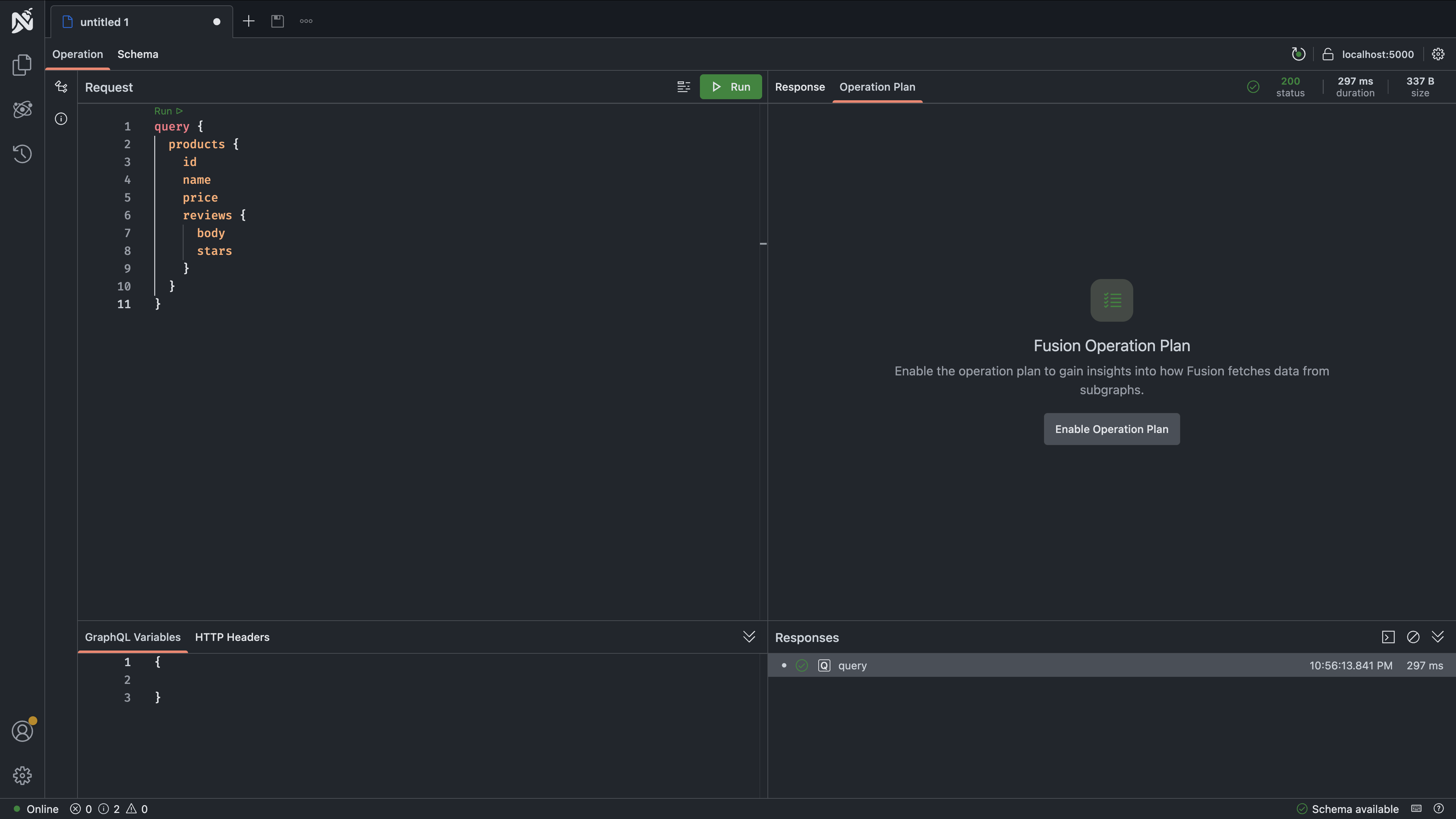
With `CollectOperationPlanTelemetry` enabled on the gateway, the plan includes telemetry such as step duration and status:
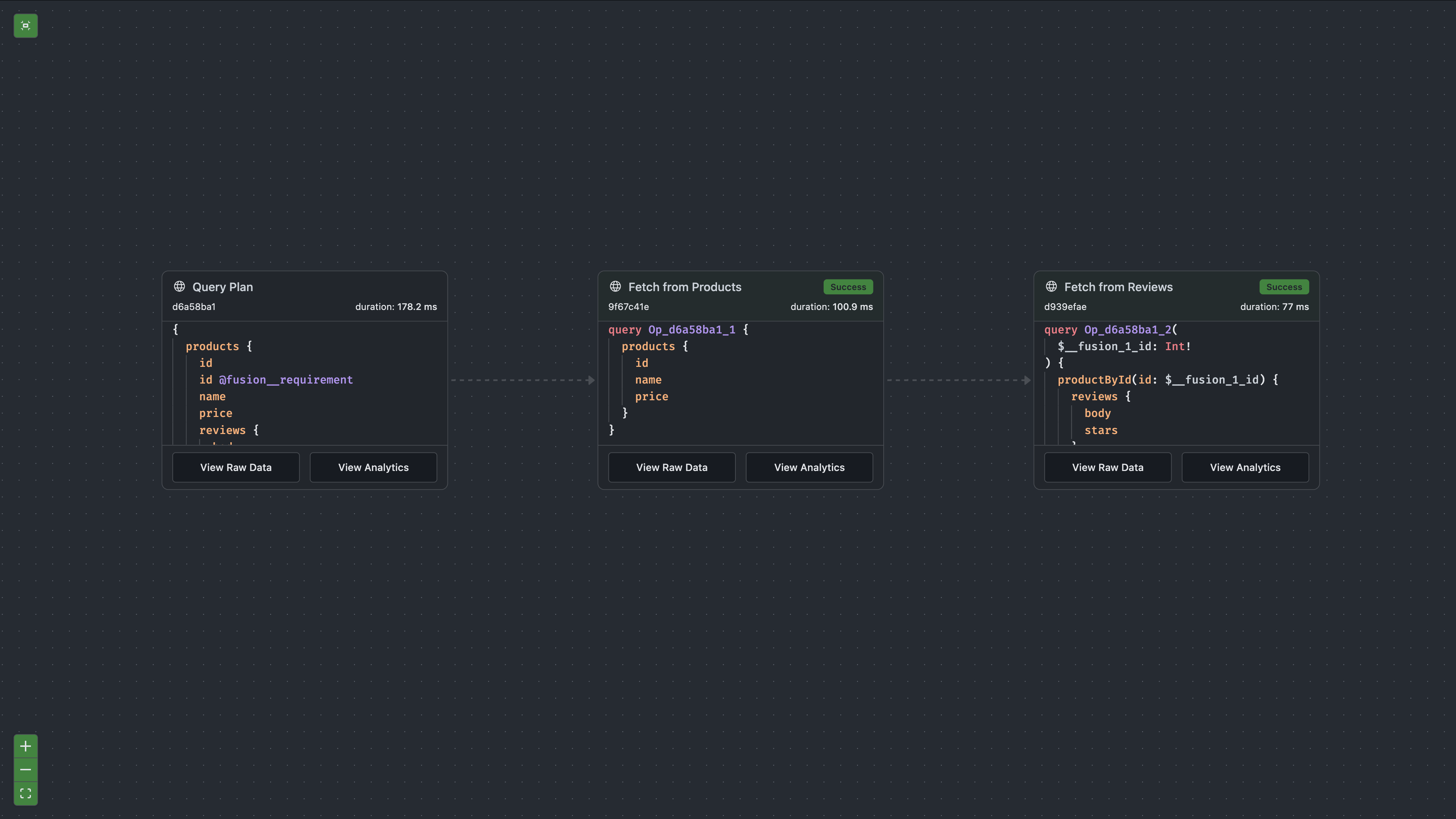
1. **Fetched the products** from the Products subgraph. This returned `id`, `name`, and `price` for each product.
2. **Resolved the reviews** from the Reviews subgraph. Using each product's `id`, the gateway called the Reviews subgraph's internal `productById` lookup to get a `Product` stub, then resolved the `reviews` field on each stub.
3. **Combined the results** into a single response that looks exactly like it came from one GraphQL server.
The client never knew that two separate services were involved. This is the core promise of Fusion: multiple subgraphs, one unified API.
### Try Another Query
You can also query in the other direction: start from reviews and reach into product data.
GraphQL
```
query {
reviews {
body
stars
product {
name
price
}
}
}
```
You should see:
JSON
```
{
"data": {
"reviews": [
{
"body": "Sturdy and well-built.",
"stars": 5,
"product": { "name": "Table", "price": 899.99 }
},
{
"body": "A bit wobbly.",
"stars": 3,
"product": { "name": "Table", "price": 899.99 }
},
{
"body": "Very comfortable!",
"stars": 5,
"product": { "name": "Couch", "price": 1299.5 }
},
{
"body": "Good value for the price.",
"stars": 4,
"product": { "name": "Chair", "price": 54 }
}
]
}
}
```
This time, `body` and `stars` came from the Reviews subgraph, while `product.name` and `product.price` came from the Products subgraph. The gateway resolved the product references by calling the Products subgraph's `productById` lookup with each review's product ID.
### Compare: Before and After Composition
Remember in the previous section, when you queried `review.product` on the Reviews subgraph directly? You could see `product.id` and `product.reviews`, but `product.name` and `product.price` were missing because those fields did not exist in the Reviews subgraph.
Now, through the gateway, `product.name` and `product.price` are available. Composition merged the Product type from both subgraphs, and the gateway resolves each field from the subgraph that owns it. This is what it means for subgraphs to contribute to one shared API.
### Lookup a Single Product
You can also look up a single product by ID:
GraphQL
```
query {
productById(id: 1) {
name
price
reviews {
body
stars
}
}
}
```
This uses the `productById` lookup from the Products subgraph, the public one that appears in the composite schema. The gateway then fetches reviews from the Reviews subgraph using its internal lookup. Public lookups serve as both client-facing query fields and gateway entity resolution entry points, while internal lookups are only used by the gateway behind the scenes.
### What You Accomplished
You proved that Fusion works:
- Clients send queries to one endpoint (the gateway)
- The gateway routes parts of each query to the appropriate subgraphs
- Multiple subgraphs contribute fields to the same types (`Product`, `Review`)
- Cross-subgraph entity resolution happens automatically through lookups
- The result is a unified API that feels like one service
The Products and Reviews subgraphs are completely independent. They do not import each other's code, do not call each other directly, and can be deployed and scaled separately. Yet clients can query across both as if they were one unified schema.
## Sharing Fields Across Subgraphs
In the tutorial so far, the Products and Reviews subgraphs each contribute **different** fields to the `Product` type. Products owns `name` and `price`, while Reviews owns `reviews`. There is no overlap, so composition works without any special annotations.
But what happens when two subgraphs need to define the **same** field on the same type? By default, Fusion treats this as an error. If two subgraphs both define `Product.name`, composition fails because Fusion does not know which subgraph should be authoritative.
The `[Shareable]` attribute solves this. When you mark a field as shareable in both subgraphs, you are telling Fusion: "these definitions are intentional and return the same data. Use whichever is most efficient."
### When You Need It
A common scenario: your Reviews subgraph needs to display the product name alongside each review. You could always fetch the name from the Products subgraph via the gateway, but if performance matters, you might want the Reviews subgraph to cache product names locally. In that case, both subgraphs would define `Product.name`:
**Products subgraph:**
C#
```
public class Product
{
public int Id { get; set; }
[Shareable]
public required string Name { get; set; }
public double Price { get; set; }
}
```
**Reviews subgraph (entity stub):**
C#
```
public sealed record Product(int Id)
{
[Shareable]
public string Name => ProductRepository.GetProductName(Id);
public List GetReviews()
=> ReviewRepository.GetByProductId(Id);
}
```
Both subgraphs define `Product.name` and mark it `[Shareable]`. Composition succeeds, and the gateway can resolve `name` from either subgraph depending on what else the query needs. If a query only asks for `product.name` and `product.reviews`, the gateway will fetch everything from the Reviews subgraph in a single call instead of making a separate trip to the Products subgraph.
### The Rule
Without `[Shareable]`, a non-key field must exist in exactly one subgraph. Key fields (like `id`) are automatically shareable, so you do not need the attribute on them. For any other field that appears in multiple subgraphs, add `[Shareable]` to **all** definitions of that field. If even one subgraph forgets to mark it, composition fails.
### When Not to Use It
Do not mark a field as shareable unless the subgraphs genuinely return the same data. If two subgraphs define `Product.name` but one returns the display name and the other returns an internal code name, marking them shareable would give clients inconsistent results depending on which subgraph the gateway happens to call.
If the fields return **different** data, they should have **different** names (e.g., `displayName` vs `codeName`) and each lives in its own subgraph without `[Shareable]`.
## What's Next
You now have a working Fusion setup: two subgraphs contributing to one composed API, served through a single gateway. Here are some directions to explore next based on what you need:
- **I want to add another subgraph to this project**: [Adding a Subgraph](https://chillicream.com/docs/fusion/adding-a-subgraph)
- **I want to understand entities more deeply**: [Entities and Lookups](https://chillicream.com/docs/fusion/entities-and-lookups)
- **I need cross-subgraph field dependencies (`[Require]`)**: [Entities and Lookups](https://chillicream.com/docs/fusion/entities-and-lookups)
- **I need to deploy this**: [Deployment & CI/CD](https://chillicream.com/docs/fusion/deployment-and-ci-cd)
- **I need to secure this**: [Authentication and Authorization](https://chillicream.com/docs/fusion/authentication-and-authorization)
- **I'm coming from Apollo**: [Coming from Apollo Federation](https://chillicream.com/docs/fusion/migration/coming-from-apollo-federation)
[Edit this page on GitHub](https://github.com/ChilliCream/graphql-platform/edit/main/website/content/docs/fusion/getting-started.md)
Last updated on **August 05, 2026** by **Michael Staib**