Subscriptions
GraphQL subscriptions let clients receive a continuous stream of results whenever something changes on the server. In a federated graph, a subscription is more involved than a query or a mutation: the stream is long-lived, the events usually originate deep inside your backend, and the data a client selects often spans several subgraphs.
Fusion supports two complementary models for subscriptions:
- Federated Event Streams. The subscription is backed by a message broker (NATS, Kafka, Azure Event Hubs, or Amazon SQS). The gateway subscribes to a broker topic, and for every event it resolves the requested fields across your subgraphs with ordinary stateless fetches. This is the recommended model for scale, because the gateway holds no per-subscription state of its own.
- Subgraph subscriptions over Server-Sent Events (SSE). The subscription is implemented by a single subgraph as a normal GraphQL subscription, and the gateway consumes that stream over SSE. This is the simplest model when a single subgraph already owns the event source.
The first half of this page covers federated event streams, including client-resumable streams. The second half covers GraphQL over SSE subgraph subscriptions.
Federated Event Streams
Federated event streams decouple the event source from the GraphQL schema. Your services publish events to a message broker; the gateway subscribes to the relevant topics and turns each event into a fully resolved GraphQL result.
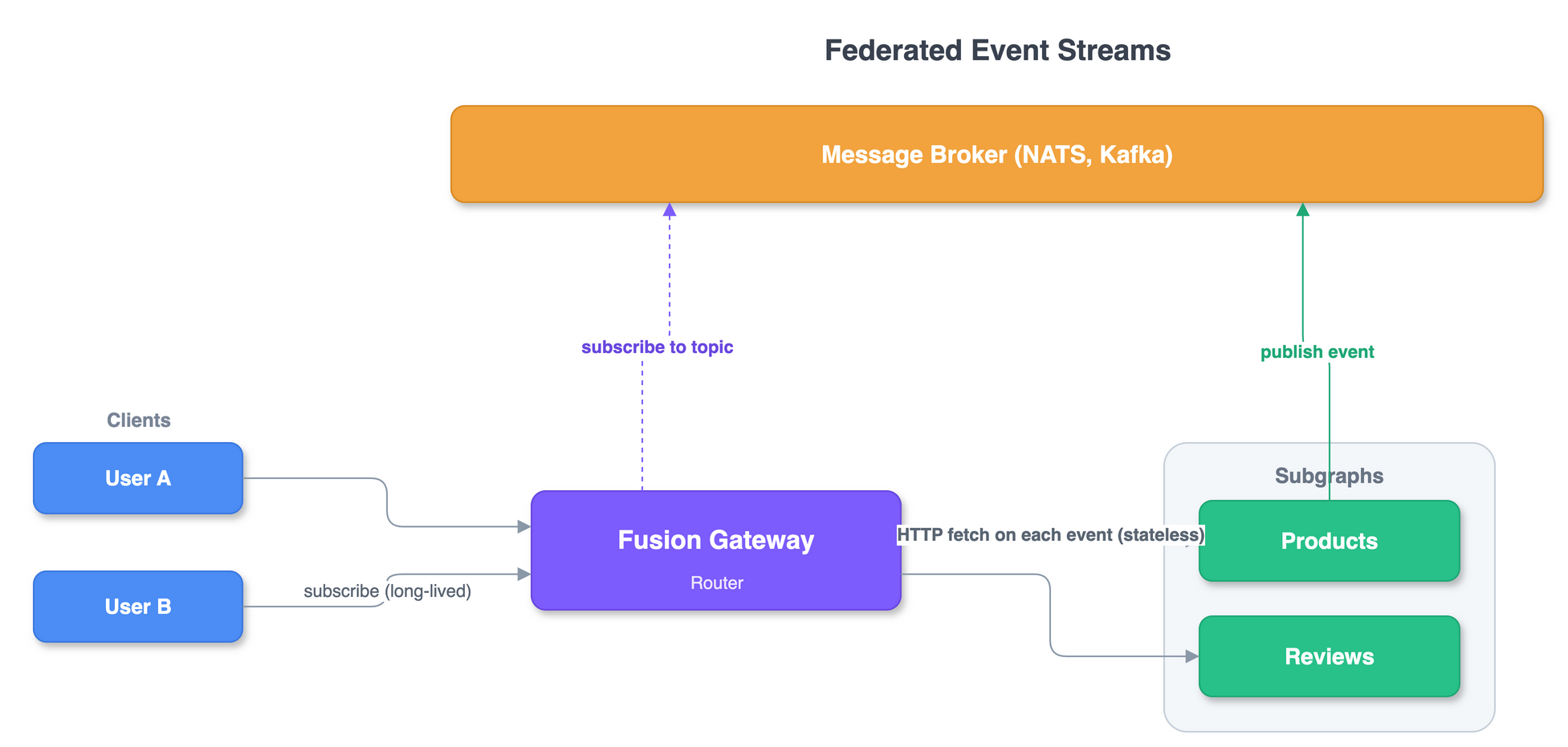
The flow has four moving parts:
- A client opens a long-lived subscription against the gateway (over WebSockets or SSE, exactly like a non-federated subscription).
- The gateway subscribes to a topic on the broker (NATS calls topics "subjects"). The gateway does not open a subscription against any subgraph for this field.
- Your services publish events to that topic. An event payload is small: it
carries just the data the gateway needs to resolve the rest of the selection set,
typically an entity key such as
{ "id": "1" }. - The gateway resolves each event by running ordinary stateless fetches against the owning subgraphs (the same entity lookups it uses for queries) and emits one GraphQL result per event to the client.
Because the gateway only holds a broker subscription (not a stateful pipeline), the gateway stays horizontally scalable, and durability and ordering are delegated to the broker.
Declaring an event stream
An event stream is a subscription root field annotated with the @eventStream
directive on the subgraph that owns the event.
The field's return type is the event payload. It does not have to be an entity: it
can be a plain type that carries pure event data, an entity whose current state the
gateway resolves, or a payload that mixes event data with links to entities. The
message argument is the bridge: it is a selection set over the return type that names
exactly the fields the broker message delivers, and the gateway resolves anything else
the client selects across your subgraphs. The example below returns the Product
entity, so the message only needs its key; Event payloads covers the
other shapes.
# Products subgraphtype Subscription {  onProductPriceChanged(productId: ID!): Product @eventStream(message: "{ id }")}
type Product @key(fields: "id") {  id: ID!  name: String!  price: Float!}
The @eventStream directive takes three arguments:
| Argument | Type | Description |
|---|---|---|
message | FieldSelectionSet! | Required. The shape of the event payload, expressed as a selection set over the field's return type. |
topics | [String!] | The broker topic(s) to subscribe to, with optional {$args.<name>} templates. When omitted, the topic is inferred from the field name and its arguments. |
broker | String | The name of the registered broker. When omitted, the default (unnamed) broker is used. |
The message selection set tells the gateway which fields the broker payload
contains. Here { id } means an event body of { "id": "1" }. The gateway uses that
key to resolve everything else the client asked for.
Because topics and broker are omitted, Fusion infers the topic from the field name
and its arguments (onProductPriceChanged-{$args.productId}) and uses the default
broker. Set them explicitly to override: see Topics and
Connecting a message broker.
In Hot Chocolate you author the same field with the [EventStream] attribute. The
directive that ends up in your schema is @eventStream; the EventStream naming is
the C# surface for it.
public class Subscriptions{ [EventStream("{ id }")] public Product OnProductPriceChanged(string productId) => EventStream.Create<Product>(productId);}
Or with the fluent API:
public class Subscriptions{    public Product OnProductPriceChanged(string productId)        => EventStream.Create<Product>(productId);}
public class SubscriptionType : ObjectType<Subscriptions>{    protected override void Configure(IObjectTypeDescriptor<Subscriptions> descriptor)    {        descriptor.Name("Subscription");
        descriptor            .Field(f => f.OnProductPriceChanged(default!))            .EventStream("{ id }");    }}
Note: The resolver body of an event-stream field never runs; the gateway fulfills these fields from the broker, not a local resolver.
EventStream.Create<T>is a compile-time placeholder that always throws. Pass the field's arguments to it so analyzers do not flag them as unused.
A client subscribes to the field like any other subscription:
subscription { onProductPriceChanged(productId: "1") { name price }}
Notice that the client selects name and price, even though the event payload
only carries id. Because onProductPriceChanged returns the Product
entity, the gateway resolves the remaining
fields the same way it resolves a federated query.
A client can even select fields owned by other subgraphs, for example reviews from a
Reviews subgraph, and the gateway fetches them per event:
subscription { onProductPriceChanged(productId: "1") { name price reviews { body } }}
Event payloads
Returning an entity, as above, is only one option. The return type can be any payload
that suits the event, and message always lists the fields the broker delivers.
When the event is self-contained, use a plain payload type. The message selects every field, and no subgraph is queried per event:
# Products subgraphtype Subscription {  onProductPriceChanged(productId: ID!): ProductPriceChangedEvent    @eventStream(message: "{ productId oldPrice newPrice }")}
type ProductPriceChangedEvent {  productId: ID!  oldPrice: Float!  newPrice: Float!}
To combine event data with live, cross-subgraph data, give the payload a field that links to an entity and include that entity's key in the message:
# Products subgraphtype Subscription {  onProductPriceChanged(productId: ID!): ProductPriceChangedEvent    @eventStream(message: "{ oldPrice newPrice product { id } }")}
type ProductPriceChangedEvent {  oldPrice: Float!  newPrice: Float!  product: Product!}
Now oldPrice and newPrice come straight from the broker message, while product is
resolved across your subgraphs from the { product { id } } key, so a client reads both
the event data and live entity fields in one event:
subscription { onProductPriceChanged(productId: "1") { oldPrice newPrice product { name reviews { body } } }}
Connecting a message broker
Brokers are registered on the gateway builder returned by AddGraphQLGateway(). Most
gateways use a single broker, which you register without a name to make it the default.
Fields then need no broker argument.
NATS
Install the HotChocolate.Fusion.Subscriptions.NATS package and register the broker:
var builder = WebApplication.CreateBuilder(args);
builder.Services    .AddHttpClient("fusion");
builder    .AddGraphQLGateway()    .AddFileSystemConfiguration("./gateway.far")    .AddNatsEventStreamBroker(options =>    {        options.Url = "nats://localhost:4222";    });
var app = builder.Build();
app.MapGraphQL();app.Run();
Kafka
Install the HotChocolate.Fusion.Subscriptions.Kafka package and register the broker:
builder .AddGraphQLGateway() .AddFileSystemConfiguration("./gateway.far") .AddKafkaEventStreamBroker(options => { options.BootstrapServers = "localhost:9092"; options.AutoOffsetReset = AutoOffsetReset.Earliest; });
Kafka gives every GraphQL subscriber its own consumer group, so each client receives
the full stream rather than competing for partitions. SASL and SSL options are
available on KafkaEventStreamOptions for secured clusters.
Azure Event Hubs
Install the HotChocolate.Fusion.Subscriptions.AzureEventHubs package and register the
broker. Each subscribed topic is treated as an Event Hub name, so the topic the gateway
resolves for a field (see Topics) must match a hub in the namespace.
Authenticate with a connection string:
builder .AddGraphQLGateway() .AddFileSystemConfiguration("./gateway.far") .AddAzureEventHubsEventStreamBroker(options => { options.ConnectionString = "<event-hubs-connection-string>"; });
Or with a fully qualified namespace and a token credential. When you set
FullyQualifiedNamespace without supplying a Credential, the broker uses
DefaultAzureCredential:
builder .AddGraphQLGateway() .AddFileSystemConfiguration("./gateway.far") .AddAzureEventHubsEventStreamBroker(options => { options.FullyQualifiedNamespace = "my-namespace.servicebus.windows.net"; options.Credential = new DefaultAzureCredential(); });
Every GraphQL subscriber reads independently, so each client receives the full stream.
By default a subscriber without a cursor starts at the latest event; set
StartFromEarliest to begin from the earliest retained event instead. Event Hubs allows
only a limited number of non-exclusive readers per partition and consumer group, so set
ConsumerGroup to spread independent gateways across consumer groups when the service
quota requires it.
Amazon SQS
Install the HotChocolate.Fusion.Subscriptions.AmazonSqs package and register the
broker. On real AWS, the region and the default AWS credential chain are usually all you
need:
builder .AddGraphQLGateway() .AddFileSystemConfiguration("./gateway.far") .AddAmazonSqsEventStreamBroker(options => { options.Region = "us-east-1"; });
Set Credentials to supply explicit AWS credentials, or ServiceUrl to point at a
LocalStack or other SQS-compatible endpoint:
builder .AddGraphQLGateway() .AddFileSystemConfiguration("./gateway.far") .AddAmazonSqsEventStreamBroker(options => { options.ServiceUrl = "http://localhost:4566"; options.Region = "us-east-1"; options.Credentials = new BasicAWSCredentials("test", "test"); });
The gateway creates a dedicated SQS queue per active subscription and deletes it when
the subscription ends. To broadcast one event to every subscriber, configure
ResolveTopicArn so each generated queue is subscribed to the SNS topic for the logical
Fusion topic:
builder .AddGraphQLGateway() .AddFileSystemConfiguration("./gateway.far") .AddAmazonSqsEventStreamBroker(options => { options.Region = "us-east-1"; options.ResolveTopicArn = topic => topic switch { "product.price-changed" => "arn:aws:sns:us-east-1:123456789012:product-price-changed", _ => null }; });
Without ResolveTopicArn, the broker runs in direct queue mode: publishers must send to
the generated SQS queue URLs themselves. That mode is useful for controlled integration
tests and custom topologies, but it is not SNS fan-out.
The queue name is derived from the logical topic using QueueNamePrefix. Tune
WaitTimeSeconds (long-poll wait), MaxNumberOfMessages (messages per receive), and
VisibilityTimeoutSeconds (raise it for slow consumers to avoid duplicate delivery) on
AmazonSqsEventStreamOptions. The broker uses standard queues and consumes at-least-once,
so design resolvers to tolerate the occasional duplicate event. SQS does not retain an
ordered history, so SQS-backed streams are not resumable.
Using multiple brokers
To run more than one broker, give each a name and select one per field with the
broker argument:
builder .AddGraphQLGateway() .AddFileSystemConfiguration("./gateway.far") .AddNatsEventStreamBroker("nats", o => o.Url = "nats://localhost:4222") .AddKafkaEventStreamBroker("kafka", o => o.BootstrapServers = "localhost:9092");
type Subscription { onProductPriceChanged(productId: ID!): Product @eventStream(message: "{ id }", broker: "nats")}
Publishing events
The gateway only consumes events. Your services publish them out-of-band using the
broker's native client. An event body must contain at least the fields named in the
field's message selection set.
With NATS:
await using var connection = new NatsConnection(    new NatsOpts { Url = "nats://localhost:4222" });
var payload = JsonSerializer.SerializeToUtf8Bytes(new { id = "1" });
await connection.PublishAsync("onProductPriceChanged-1", payload);
With Kafka:
using var producer = new ProducerBuilder<Null, byte[]>(    new ProducerConfig { BootstrapServers = "localhost:9092" })    .Build();
var payload = JsonSerializer.SerializeToUtf8Bytes(new { id = "1" });
await producer.ProduceAsync(    "onProductPriceChanged-1",    new Message<Null, byte[]> { Value = payload });
producer.Flush();
With Amazon SQS, publish to the SNS topic that the gateway's ResolveTopicArn maps the
logical topic to. SNS fans the message out to every subscribed queue:
using var sns = new AmazonSimpleNotificationServiceClient();
var payload = JsonSerializer.Serialize(new { id = "1" });
await sns.PublishAsync(    "arn:aws:sns:us-east-1:123456789012:product-price-changed",    payload);
In direct queue mode (no ResolveTopicArn), there is no shared topic to publish to;
you send to the per-subscription queue URLs yourself, which is mainly useful for tests.
Topics
By default Fusion infers the topic from the field name and its arguments, joined with
hyphens: onProductPriceChanged(productId: ID!) infers onProductPriceChanged-{$args.productId},
and a field with two arguments infers <fieldName>-{$args.arg1}-{$args.arg2}, and so on.
Set topics explicitly when you need a different name. A topic can contain
{$args.<name>} placeholders that the gateway expands against the arguments a client
supplies when it subscribes:
type Subscription { onProductPriceChanged(productId: ID!): Product @eventStream( message: "{ id }" topics: ["product.price-changed.{$args.productId}"] )}
A client subscribing with onProductPriceChanged(productId: "1") is wired to the
topic product.price-changed.1, so it only receives the events relevant to that
product. This keeps fan-out at the broker rather than in the gateway.
Note:
{$args.<name>}is the placeholder. To include a literal brace in a topic, double it:{{produces{and}}produces}. To wrap a value in literal braces, escape the outer pair, sotopic-{{{$args.productId}}}resolves totopic-{1}(forproductId: "1"), andtopic-{{{{{$args.productId}}}}}resolves totopic-{{1}}.
Client-resumable subscriptions
A long-lived subscription will, sooner or later, be interrupted: a client loses connectivity, a mobile app is suspended, or the gateway is redeployed. Resumable subscriptions let a client pick up exactly where it left off, without missing events and without re-receiving events it has already processed.
Resumption is driven by an opaque cursor. The broker assigns each event a cursor; the client stores the most recent one and, on reconnect, passes it back to resume the stream from immediately after that event.
Only single-topic event streams are resumable. A cursor identifies a position within a
single ordered topic, so a field that subscribes to multiple topics cannot be resumed:
passing a cursor to such a field resolves it to null with an error. Keep a field to a
single topic when it needs to support resumption.
Two markers wire this up, both expressed with the @eventCursor directive:
- An argument marked
@eventCursoraccepts the resume cursor. - An output field marked
@eventCursorcarries the cursor of each emitted event so the client can store it.
To carry a cursor, the subscription returns a small event payload type that holds the changed entity together with the cursor field.
# Products subgraphtype Subscription {  onProductPriceChanged(    productId: ID!    after: String @eventCursor  ): ProductPriceChange @eventStream(message: "{ product { id } }")}
type ProductPriceChange {  product: Product!  cursor: String @eventCursor}
In Hot Chocolate, mark the resume argument with [EventCursor] and the cursor
property with [property: EventCursor]:
public class Subscriptions{    [EventStream("{ product { id } }")]    public ProductPriceChange OnProductPriceChanged(        [EventCursor] string? after,        string productId)        => EventStream.Create<ProductPriceChange>(after, productId);}
public record ProductPriceChange(    Product Product,    [property: EventCursor] string Cursor);
The fluent equivalent marks the argument with .EventCursor():
descriptor .Field(f => f.OnProductPriceChanged(default, default!)) .EventStream("{ product { id } }") .Argument("after", a => a.EventCursor());
How a client resumes
On the initial subscription, the client selects the cursor field and stores the value from each event:
subscription { onProductPriceChanged(productId: "1") { product { name price } cursor }}
// event 1{ "data": { "onProductPriceChanged": { "product": { "name": "Gadget", "price": 9.99 }, "cursor": "Y3Vyc29yLTE=" } } }// event 2{ "data": { "onProductPriceChanged": { "product": { "name": "Gadget", "price": 8.49 }, "cursor": "Y3Vyc29yLTI=" } } }
After a disconnect, the client re-issues the same subscription and passes the last
cursor it received as the @eventCursor argument:
subscription { onProductPriceChanged(productId: "1", after: "Y3Vyc29yLTE=") { product { name price } cursor }}
The stream resumes strictly after that event: in this example the client receives event 2 onward and never re-receives event 1. A first-time subscriber simply omits the argument.
The cursor is an opaque, base64-encoded token. Its meaning is owned by the broker (a
JetStream sequence for NATS, a topic:partition:offset for Kafka, a
partition:sequenceNumber for Azure Event Hubs), so clients should
treat it as a black box and never parse or construct it.
Note: Resumable streams need a broker that retains and orders history. Configure NATS with JetStream, or use Kafka or Azure Event Hubs. Core NATS pub/sub does not keep history, so it cannot resume, and Amazon SQS deletes each event once delivered, so SQS-backed streams cannot resume either.
For NATS, enable JetStream when registering the broker:
builder .AddGraphQLGateway() .AddFileSystemConfiguration("./gateway.far") .AddNatsEventStreamBroker(options => { options.Url = "nats://localhost:4222"; options.JetStream = new NatsJetStreamOptions { Stream = "products", DurableConsumer = "gateway" }; });
If a client passes a cursor the broker cannot honor, the field resolves to null with
an error, and no broker subscription is opened:
{ "errors": [ { "message": "The cursor is invalid.", "path": ["onProductPriceChanged"] } ], "data": { "onProductPriceChanged": null }}
Subscriptions over Server-Sent Events
Not every subscription needs a broker. When a single subgraph already implements a GraphQL subscription, the gateway can federate it directly by consuming that subgraph's stream over Server-Sent Events (SSE) or JSON Lines.
This is fetch-based: the gateway sends an HTTP request to the subgraph and reads the streamed response. There is no WebSocket connection between the gateway and the subgraph.
Serving SSE from a subgraph
A Hot Chocolate subgraph serves subscriptions over SSE automatically. There is no SSE-specific switch to flip. Define a subscription type, register a subscription provider, and map the GraphQL endpoint:
builder.Services    .AddGraphQLServer()    .AddQueryType<Query>()    .AddSubscriptionType<Subscription>()    .AddInMemorySubscriptions(); // or .AddRedisSubscriptions(...)
var app = builder.Build();
app.MapGraphQL();app.Run();
The GraphQL HTTP endpoint negotiates the transport from the Accept header. When a
caller requests text/event-stream, the server streams the result using the
graphql-sse
protocol. You can verify it with curl:
curl -N \ -H 'Content-Type: application/json' \ -H 'Accept: text/event-stream' \ -d '{"query":"subscription { onReviewAdded { body } }"}' \ http://localhost:5000/graphql
event: nextdata: {"data":{"onReviewAdded":{"body":"Great product"}}}
event: nextdata: {"data":{"onReviewAdded":{"body":"Works as described"}}}
event: complete
For details on defining subscriptions in a subgraph (the [Subscribe] and [Topic]
attributes, ITopicEventSender, and the in-memory, Redis, NATS, and Postgres
providers), see
Hot Chocolate subscriptions.
Configuring the subgraph transport
By default the gateway advertises both JSON Lines and SSE when it subscribes to a
subgraph (sending Accept: application/jsonl, text/event-stream), and the subgraph's
response content type decides which is used. You can control this per subgraph in its
settings under the HTTP transport's subscription capability:
{ "name": "Reviews", "transports": { "http": { "url": "http://reviews/graphql", "capabilities": { "subscriptions": { "supported": true, "formats": ["text/event-stream"] } } } }}
Set supported to false to tell the gateway a subgraph does not serve
subscriptions, or restrict formats to pin a single transport.
Note: Subgraph subscriptions are only supported through the default HTTP connector. Subgraphs integrated through the Apollo Federation connector cannot serve subscriptions.
Choosing between event streams and SSE
Both models expose a normal GraphQL subscription to clients. They differ in how the gateway sources events:
- Federated event streams source events from a message broker and resolve the selection set with stateless fetches. Prefer them when events fan out to many subscribers, when you need durability or resumable streams, or when the event source is not a subgraph.
- SSE subgraph subscriptions source events from a single subgraph that implements the subscription itself. Prefer it when one subgraph already owns the event source and you do not need a broker.
Directive reference
For the full SDL of @eventStream and @eventCursor, including the composed output,
see the Directive Reference.